
All content Copyright 2022 Parallel Systems Ltd.
Note: The Online DRCs, if active, may be showing that the footprint(s) are not found in the configured libraries. This won’t be a concern for these labs since there won’t be any board created from this design.
1. Left-click in the Project Manager window and select the .\Lesson10 design name.
2. Select PCB>Design Rules Check from the top menu.
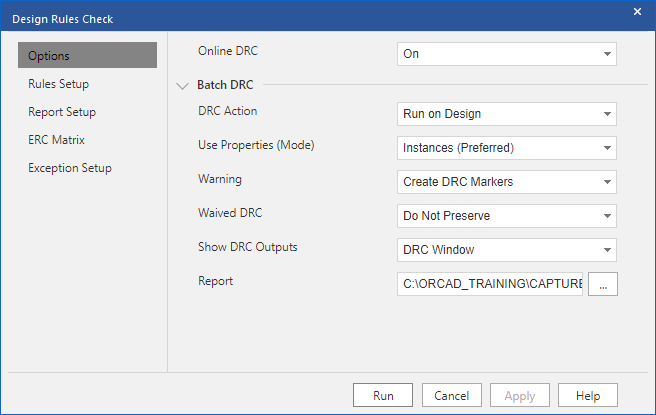
3. In Options, set the options as shown below.
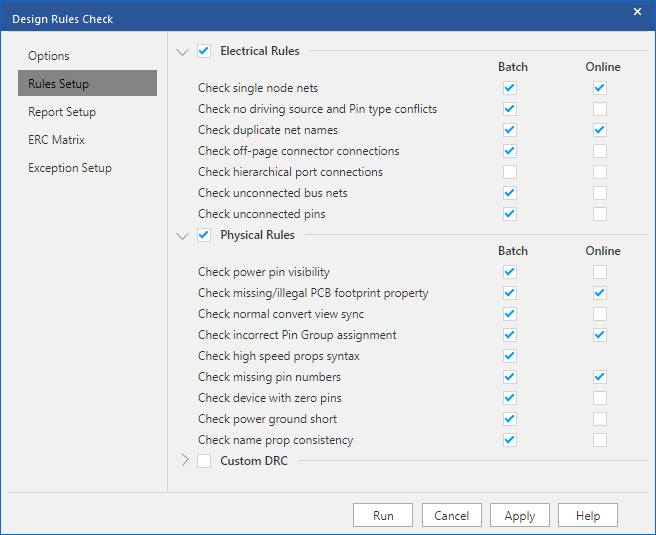
4. In Rules Setup, set the options as shown below:
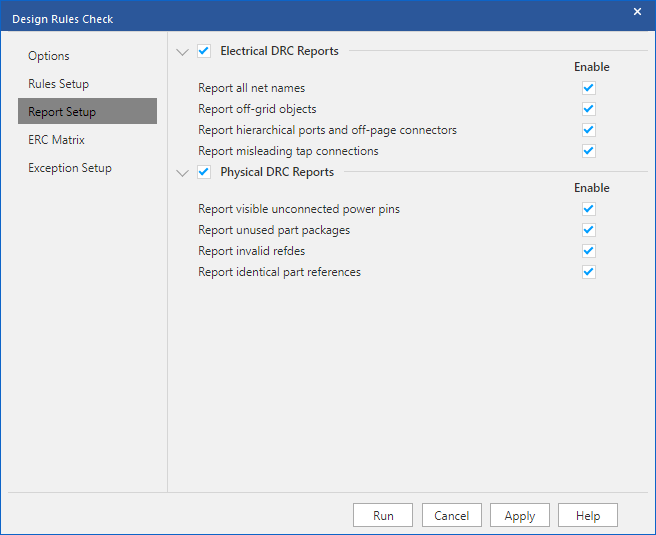
5. In Report Setup, set the options as shown in the following screen shot:
6. Left-click>Run.
7. Review the DRC report, double-click on the DRC file entry in Outputs in the Project Manager.
8. Close the DRC report window.
9. IF you have any DRC errors, correct them and run the DRC process until it is “clean”.
(Just to note again, don’t worry about any Online DRCs reporting missing footprints,)
End of Lab
All content Copyright 2022 Parallel Systems Ltd.