
Hierarchical designs can allow a design to be organised functionally with blocks rather than using multiple pages.
Hierarchical design structure
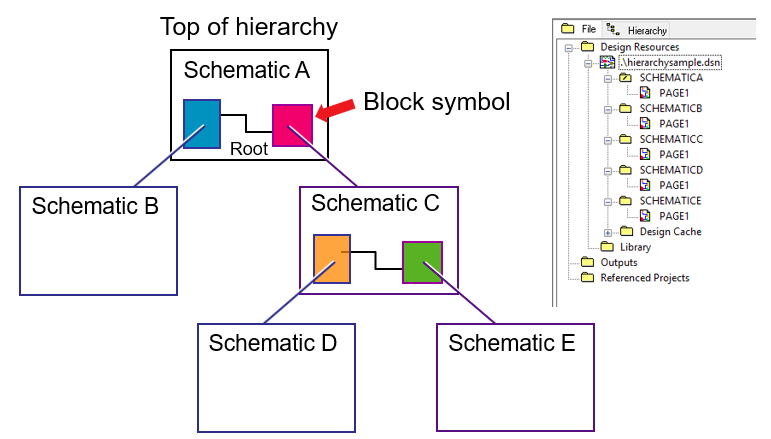
In this illustration of a hypothetical design, the design starts at SchematicA, the root schematic, this has within the Page, two blocks, one referencing SchematicB and another referencing SchematicC. SchematicC has two blocks within its Page that reference SchematicD and SchematicE.
By convention, but not a requirement, the Schematic that defines a hierarchical block contains a single page, since this simplifies navigation. Multiple pages can be used for the Schematic defining the hierarchical block, if required.
Note that it is the Schematic Folders, which have to be uniquely named in a design file, and not the Schematic Pages, which don’t have to be uniquely named, that are linked in a hierarchical design.
Since the hierarchical blocks behave as “virtual components”, it is possible to copy and paste hierarchical blocks and have multiple blocks referencing the same underlying Schematic, this is referred to as a “complex hierarchy”. In a “complex hierarchy”, there is a single underlying schematic that defines the block and multiple sets of properties, one set for each block that references the Schematic. Using a “complex hierarchy” in a design is efficient where blocks of the design are repeated, like multiple channels as an example. Since the underlying Schematic is common, editing the underlying schematic once will change the definition for all of the blocks that reference that schematic.
Note that the Hierarchical Blocks are created within the Design and cannot be copied between designs.
Connectivity in a hierarchical design
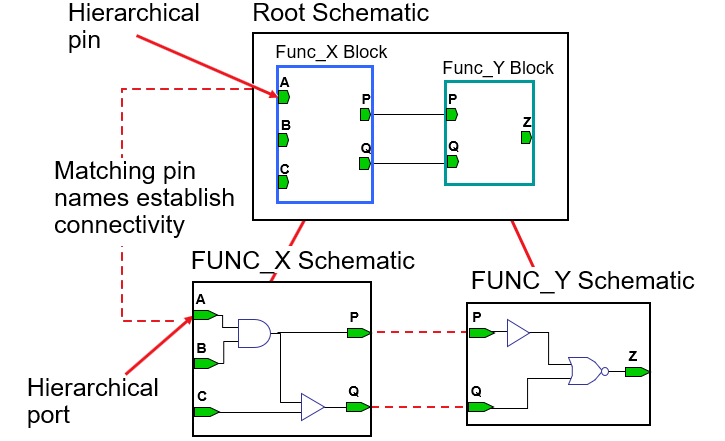
Hierarchical Pins are added to the Hierarchical Blocks and match the underlying Hierarchical Ports by name. Note that the Pin and Port Names won’t appear in any netlist.
Pin and Port Types in a Hierarchical Design
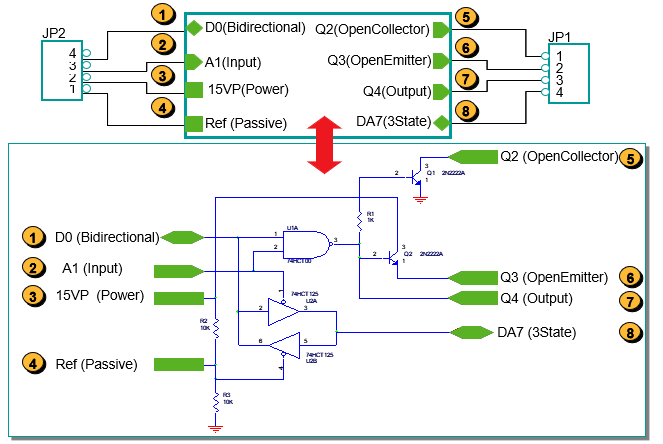
Unlike Off-Page Connectors, Hierarchical Pins and Ports do have a “sense of direction”. The graphical appearance for the Hierarchical Pins have is fixed for each Pin Type but, whilst the underlying Ports have a default graphical appearance, there a Type Property that controls what the actual Port Type is. As a consequence, some users like to make the Type Property Value visible.
Hierarchical Design Methods
Hierarchical designs can be created “Top-down”, or “Bottom-up”, or a mix of both. “Top-down” would typically be used where a system is “sketched out” as functional blocks with, potentially, no Pins added to the blocks and no underlying schematics defined, and the details within the Schematics would be “filled in” as the design develops. “Bottom-up” would be used where there are already schematics defining the functionality and the blocks determined from them. (This is the method that is used in the Lab exercise)
All content Copyright 2022 Parallel Systems Ltd.