
All content Copyright 2022 Parallel Systems Ltd.
1. Start OrCAD Capture, or Capture CIS
Start (Windows Icon) >Cadence PCB 17.4-2019>Capture CIS 17.4
Select any Capture, Capture CIS, or OrCAD PCB Designer license if you see the License Picker.
(Which license / product is selected is not important for this exercise)
2. Open the release.opj project from within the project directory
3. Left-click the release.dsn design (dsn) file entry in the Project Manager.
4. Select PCB>Update Schematic from the top menu.
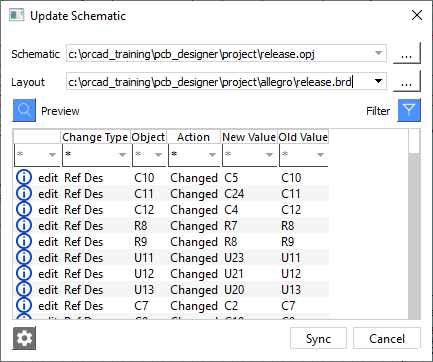
Notice that there are a number of changes listed between the Board and the Schematic.
(Not least because the Board references were changed)
(Your reference changes may differ from the screen shot)
5. Left-click>Sync
The changes are made to the schematic.
Explore the schematic pages to confirm that the changes have been made, especially check for the manually edited Part Reference from the previous lab.
End of Lab
All content Copyright 2022 Parallel Systems Ltd.