
All content Copyright 2020 Parallel Systems Ltd.
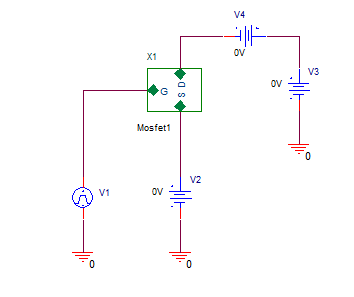
1. Open the project called VMAX from the C:\OrCAD_Training\PSpice folder
2. Examine the circuit and the simulation profile. This design has a hierarchical block where “Mosfet1” references a custom model called MENHT. The Simulation Profile performs a nested DC sweep simulation.
3. Run the simulation.
4. After the probe window opens, Add the trace I(V4), V4 is a 0V DC source being used as a current sense, so this trace is the current into the drain of the MOSFET, double-click on the trace name that is below the X-axis.
5. Position the cursor in the Trace Expression field and edit the trace to be D(I(V4)). This trace is now the derivative of the original trace. Looking at the updated trace, notice the changes in the derivative along each curve. “straight lines”
6. Go back to the schematic and double-click on the Mosfet1 value and edit this to be Mosfet2 This will change the definition for the mosfet in the circuit to a high power, low Rdson, commercial model.
7. Run the Simulation again and add the trace following steps 4 and 5 above, note that the derivative is now “curved”.

End of Lab
All content Copyright 2020 Parallel Systems Ltd.