
Capture designs for PSpice support the use of both hierarchical blocks and hierarchical symbols but Capture designs for PCBs only support hierarchical blocks.
Hierarchical Blocks
Hierarchical Blocks belong to the Schematic design that they were created in, they can be copied within the same design but not between designs. The hierarchical block references an underlying Schematic, linked by the Schematic Folder Name, and the Schematic needs to be present to maintain design integrity.
Hierarchical Blocks can be drawn and the contents determined at a later stage, “top-down”, or derived from an existing Schematic, “bottom-up”.
Hierarchical Symbols
For a hierarchical Symbol, the underlying Schematic needs to exist, “bottom-up”. The symbols can be added to a library and re-used in Capture designs intended for use with PSpice. The defining Schematic needs to be present, at least found from the design, to maintain the design integrity.
Connections through a design
In all Capture designs, Nets of the same Name on the same Page are automatically connected, no connector Symbol is required.
In Capture designs for PSpice, nodes are common across the Pages so that, a node, Net, named X on one Schematic Page will be connected to a node, Net, named X on another Schematic Page (at the same level in the hierarchy) This isn’t true of Capture designs for PCBs where an Off-Page Connector will always be required to make Net connections across Pages (at the same level in the hierarchy)
To connect through the hierarchy, hierarchical ports are required to define the connection nodes from the underlying Schematic definition for the functionality of the block. These are matched to either the Hierarchical Pins on a Hierarchical Block, or to the Pins of a Hierarchical Symbol, by matching the Name of the Port and the Pin.
Placing a Hierarchical Block
To place a Hierarchical Block, use: Place>Hierarchical Block from the menu; or use the Place Hierarchical Block icon (  ) from the Schematic toolbar.
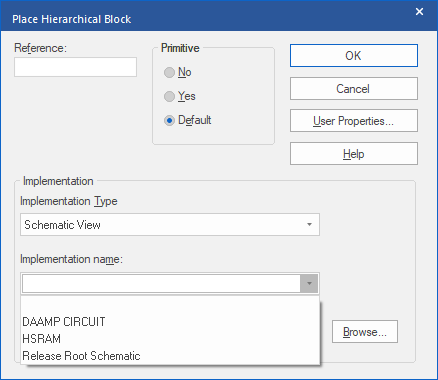
The Hierarchical Block needs: a Reference, typically following the convention of a Part Reference, starts with a Letter, ends with a number, and doesn’t contain any spaces; an Implementation Type, Schematic View for an underlying Schematic; the Implementation Name, name of the Schematic folder that contains the Schematic to reference. Leave the path empty to specify “in the current DSN file”.
Whilst it is possible to make references to external DSN files, this isn’t an especially reliable way of constructing hierarchical designs.
Once the form is filled and OK is left-clicked, the cursor in the Schematic Page will be a cross, left-click and drag to create a rectangle for the hierarchical block. If there is an existing underlying Schematic with Hierarchical Ports, Hierarchical Pins will be added to the block once it has been placed. The Hierarchical Pins can be moved by selecting with a left-click and dragging the Hierarchical Pin around the boundary of the Hierarchical Block rectangle. If Pins are dropped on top of each other, the “hot-spot” will disappear, since a connection will have been made, but the Hierarchical Pins can be separated with a left-click and drag on the Hierarchical Pins, only one Hierarchical Pin will ever be selected by this action.
Navigating the Hierarchy
For a Hierarchical Block, a double-click on the block will descend to the underlying Schematic definition. For both Hierarchical Blocks and Hierarchical Symbols, selecting and a right-click>Descend Hierarchy can also be used.
If the underlying Schematic does not exist, you will be prompted to create a new Page for the underlying Schematic definition. If descending from a Hierarchical Block with Hierarchical Pins, Hierarchical Ports matching the Hierarchical Pins will be added to the created Page.
Netlist formats
Capture can create “flat” or “hierarchical” netlist formats for PSpice. The hierarchical format will reduce the underlying Schematic to a sub-circuit in the netlist. The netlist formats are just different, there is anything more, or less, efficient about the two formats.
All content Copyright 2022 Parallel Systems Ltd.