
All content Copyright 2022 Parallel Systems Ltd.
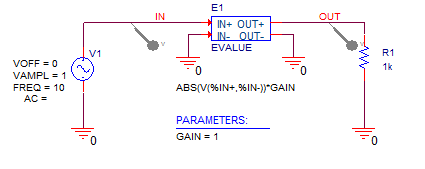
Reference Schematic:
1. Create a new, empty project for this lab.
2. Place and connect the symbols for the circuit above: VSIN, 0, Evalue, R, PARAM. Place Voltage Markers on the input source and output load nets, the properties will be configured in the next steps.
3. Define the GAIN parameter property and give it a default value of 1.
4. Double-click the VSIN symbol to edit the properties and set VOFF to 0, VAMPL to 1 and FREQ to 10. (Don’t change the AC property)
5. Double-click the default expression for the Evalue device (V(%IN+,%IN-)) and change it to ABS(V(%IN+,%IN-))*GAIN.
6. Set up a transient simulation profile with a Run to Time of 0.5 and 0.001 (or 1m) Maximum Step Size.
7. Run the simulation and observe the output.
(See image below)
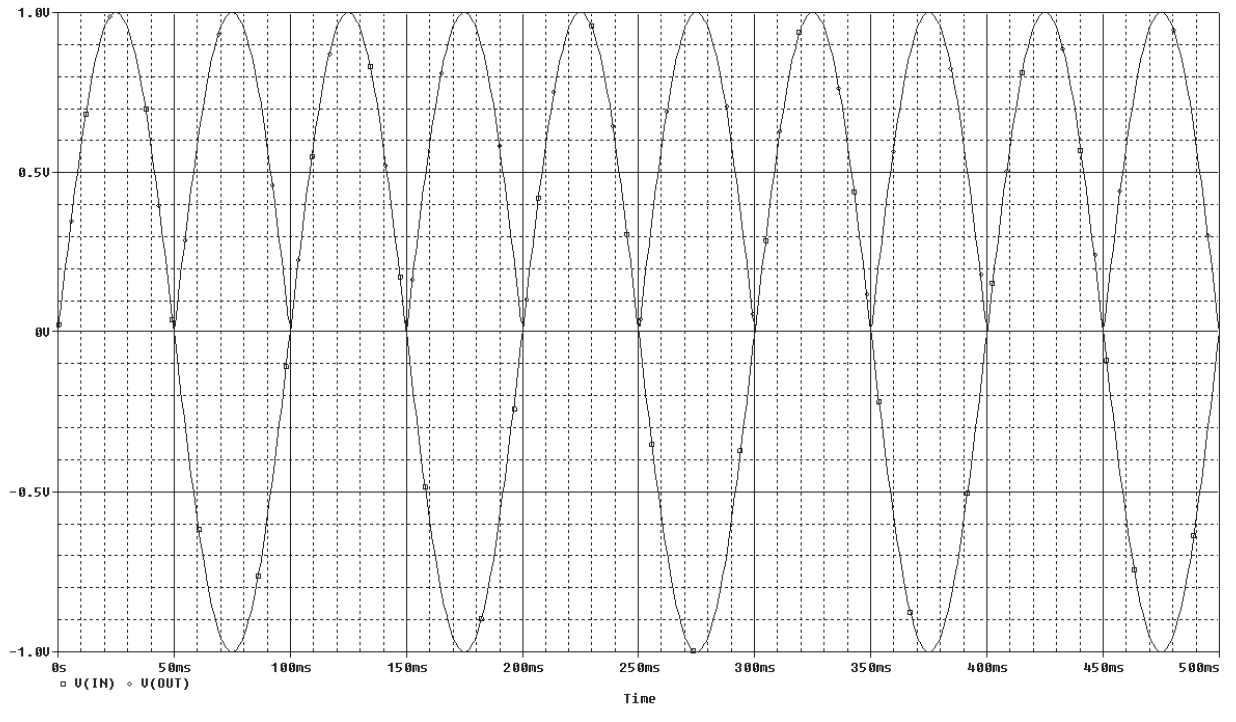
8. Change the gain and re-run the simulation. If you want to make the gain an expression you must enclose it in curly braces. For example, use GAIN ={2*5}.

End of Lab
All content Copyright 2022 Parallel Systems Ltd.