
All content Copyright 2022 Parallel Systems Ltd.
1. If necessary, re-open Lesson10.
2. Double-click each schematic page to open both pages of the Lesson10 design.
3. Maximise the schematic windows and use Zoom Fit to view the page contents.
4. Use the tabs to toggle between PAGE1 and PAGE2.
5. Left-click the .\Lesson10.dsn entry in the Project Manager to highlight the design.
6. Select Tools>Annotate from the top menu.
7. In the Action section of the Annotate window, left-click on Add Intersheet References.
8. Left-click>OK.
(OK the Undo warning if it appears)
The Inter-sheet References window appears.
9. Set the following options as shown below.
(Leave the other settings)
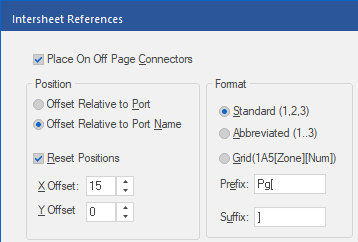
10. Left-click>OK.
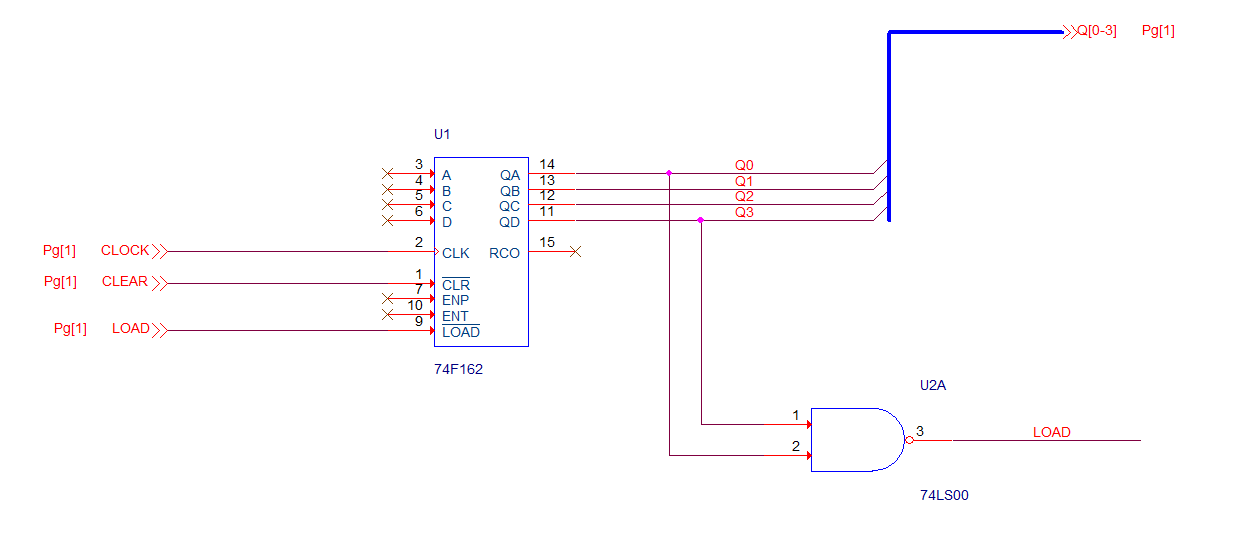
Open a schematic page, using the tab, and observe that the inter-sheet references are set close to the off-page connectors, and they now include the specified prefix and suffix.
11. The schematic page should look something like the following below.
End of Lab
All content Copyright 2022 Parallel Systems Ltd.