
All content Copyright 2022 Parallel Systems Ltd.
1. Left-click .\training.dsn in the Project Manager window.
2. Select PCB>Design Rules Check from the top menu.
3. In the Design Rules Check window, enter the following settings:
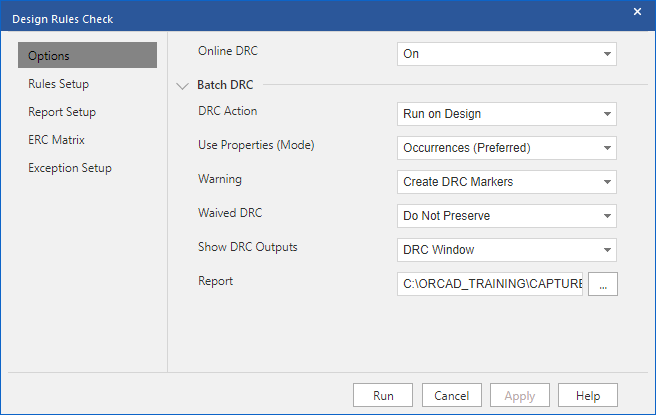
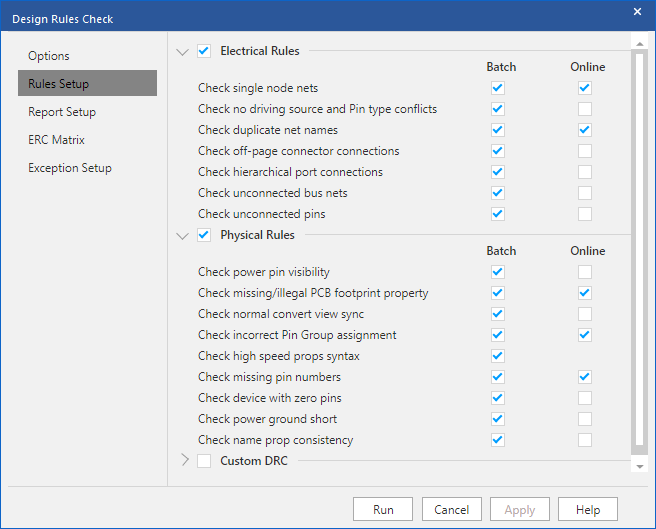
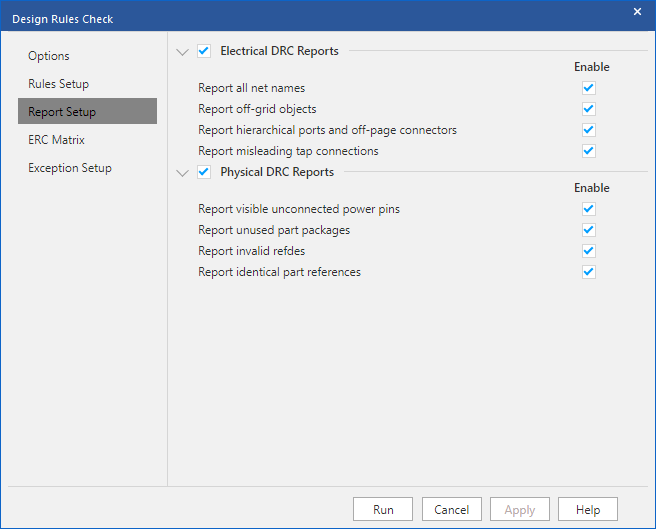
4. Set the DRC Rules and Report Setups to match the following screen shots.
5. Left-click>Run
6. Double-click the training.drc entry in the Outputs folder of the project manager window to view the DRC report.
This report contains five different sections, one for each of the schematic folders in the design. These five sections are:
• Training Root Schematic
• HSRAM
• Data_Schematic
• DAAMP1 DAAMPCircuit
• DAAMP2 DAAMPCircuit
Take note of the sections within the report that contain warnings. Capture generates DRC markers on the schematic pages where errors are occurring.
7. Close the DRC report window.
In the Project Manager window, observe that the .\training.drc file was added to the Outputs folder.
End of Lab
All content Copyright 2022 Parallel Systems Ltd.