
All content Copyright 2022 Parallel Systems Ltd.
1. In the Project Manager, left-click on the design file and select Tools>Create Netlist from the top menu.
2. Left-click the PCB tab.
3. Set the Create Netlist options, as shown in the following graphic.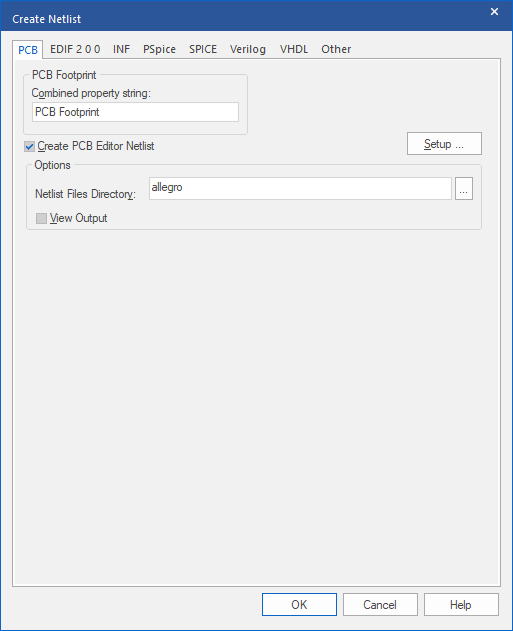
4. Left-click>OK.
5. Left-click>Yes to create an allegro folder for the netlist files.
Observe that in the Project Manager window, the three PCB Editor netlist files are listed in the Outputs folder.
6. In the Project Manager window, double-click the pstchip.dat entry under Outputs.
This is the library definition file. Close the window.
7. In the Project Manager window, double-click the pstxnet.dat entry under Outputs.
This is the nets and net properties file. Close the window.
8. In the Project Manager window, double-click the pstxprt.dat entry under Outputs.
This is the parts list and part properties file.
9. Close the netlist windows when you have finished.
10. Select File>Close Project from the top menu.
End of Lab
All content Copyright 2022 Parallel Systems Ltd.